Compile logs and errors
When a compile runs, its log streams into the Output panel below the editor. When a compile fails, the panel opens on a short list of errors that takes you to the line that caused each one.
Open the Output panel
Section titled “Open the Output panel”Click Output at the bottom of the editing area to show or hide the panel. It opens by itself when a compile fails (except on very short screens, such as a phone held sideways).
The panel header shows the state of the latest compile:
| Badge | Meaning |
|---|---|
| Compiling… | LaTeX is running and the log is streaming in. |
| Waiting for server… | The compile is queued and waiting for a free compile server. |
| Done | The compile succeeded. The last line reads, for example, Compiled successfully — 12 pages, 3400ms. |
| N errors | The compile failed. The panel lists the errors. |
Fix an error
Section titled “Fix an error”- Compile. If it fails, the Output panel opens on the error summary.
- Read the first error. Each error is listed once, with:
- where it happened, such as
chapters/method.tex:42, - the error message,
- the source line TeX stopped on,
- for common errors, a hint with a lightbulb icon, such as “Add \usepackage{amsmath} to the preamble.”
- where it happened, such as
- Click the location (for example
chapters/method.tex:42) to open that file at that line. - Fix the problem and compile again.
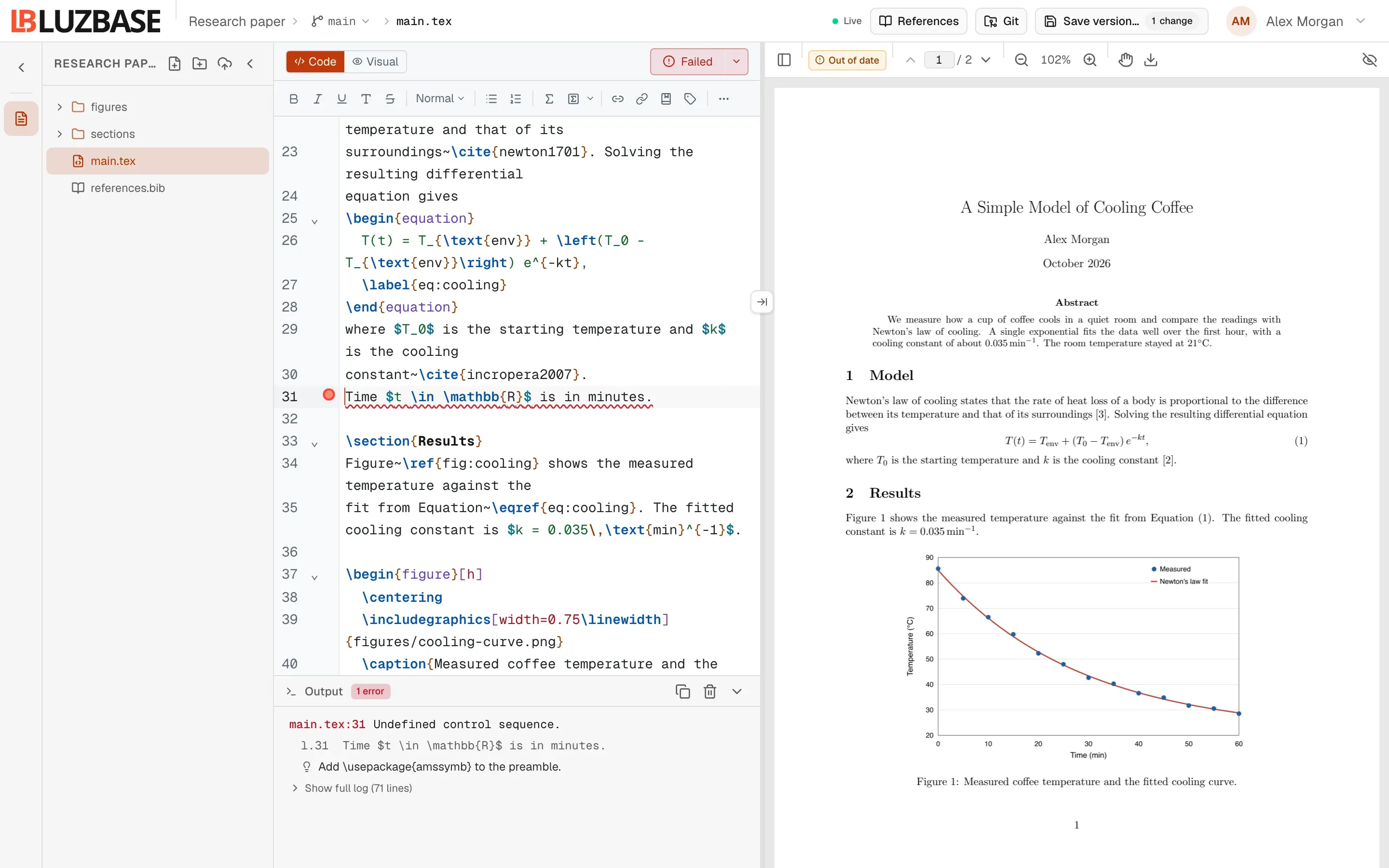
Errors also appear in the editor itself: a wavy underline marks the line, and you can hover it to read the message. Errors are red, warnings and missing references are underlined as warnings, and overfull or underfull boxes show as information.
Some errors point to a file that the compile generated, such as out/main.bbl. You cannot open that file. The hint tells you to fix the matching entry in your .bib file instead.
Read the full log
Section titled “Read the full log”Below the error summary, click Show full log (N lines) to see everything LaTeX printed. Click Hide full log to fold it again.
In the panel header:
- Copy logs copies the whole log to your clipboard, for example to paste into a support request.
- Clear empties the panel.
Common compile messages
Section titled “Common compile messages”When the compile itself stops, the panel shows a line that starts with ! Compilation failed:.
The compile took too long
Section titled “The compile took too long”The document took longer than the 55 s time limit to compile and was stopped. Many or large figures (TikZ, pgfplots) are the usual cause: try draft mode, externalising the figures, or compiling one chapter at a time.
Each LaTeX run has 55 seconds, on every plan. To get under the limit:
- add
draftto your document class while you write (\documentclass[draft]{report}), which skips images. Luzbase has no separate draft mode setting; - save complex TikZ or pgfplots figures as PDF images and include those instead;
- compile one chapter at a time with
\includeonly{chapters/method}in the preamble.
Other messages
Section titled “Other messages”| Message | What it means |
|---|---|
<file>:<line>: <message> |
LaTeX stopped on this error. Click the location in the summary to go there. |
| “The document has no content yet, so there is no page to show. …” | There is nothing between \begin{document} and \end{document}. Add some text. |
| “LaTeX stopped (…) without naming an error; see the log for details.” | Open the full log and look near the end. |
| “The document wrote … past the 500 MB file size limit and was stopped. …” | Usually a loop that never ends, such as a recursive macro. |
| “the project contains a latexmk configuration file (latexmkrc), which is not allowed; remove it and compile again” | Delete the latexmkrc file from the project. |
Messages that start with ! Compile submit failed: or ! Infrastructure error: mean the compile could not start:
| Message | What to do |
|---|---|
| “too many requests, please try again later” | You started a lot of compiles in a short time. Wait a moment. |
| “live preview paused: the compile service is at capacity” | Too many compiles are already running for this project. Wait for them to finish, then compile again. |
| “the branch’s text files total more than 31 MiB, which is more than a compile can take” | Your text files are too large in total. Remove or shrink large data files. |
| “compile service unavailable” or “compile service error” | The compile service is down or restarting. Try again in a minute. |
Waiting for a compile server
Section titled “Waiting for a compile server”If no output arrives after 20 seconds, the panel shows “Waiting for a compile server… The compile starts as soon as one is free; this can take a while when the service is busy or restarting.”
If nothing answers within about 2 minutes, the panel shows “! No compile server answered in 2 minutes. The compile service may be down or restarting. Compile again to retry.” A message “The compile did not finish” also appears, with a Retry button.
If the problem continues, contact support.