Invite collaborators
As a project owner, you add people to a project by sending them an email invitation. You choose whether each person joins as an Editor or a Viewer.
Send an invitation
Section titled “Send an invitation”- Open the project and go to the Members tab.
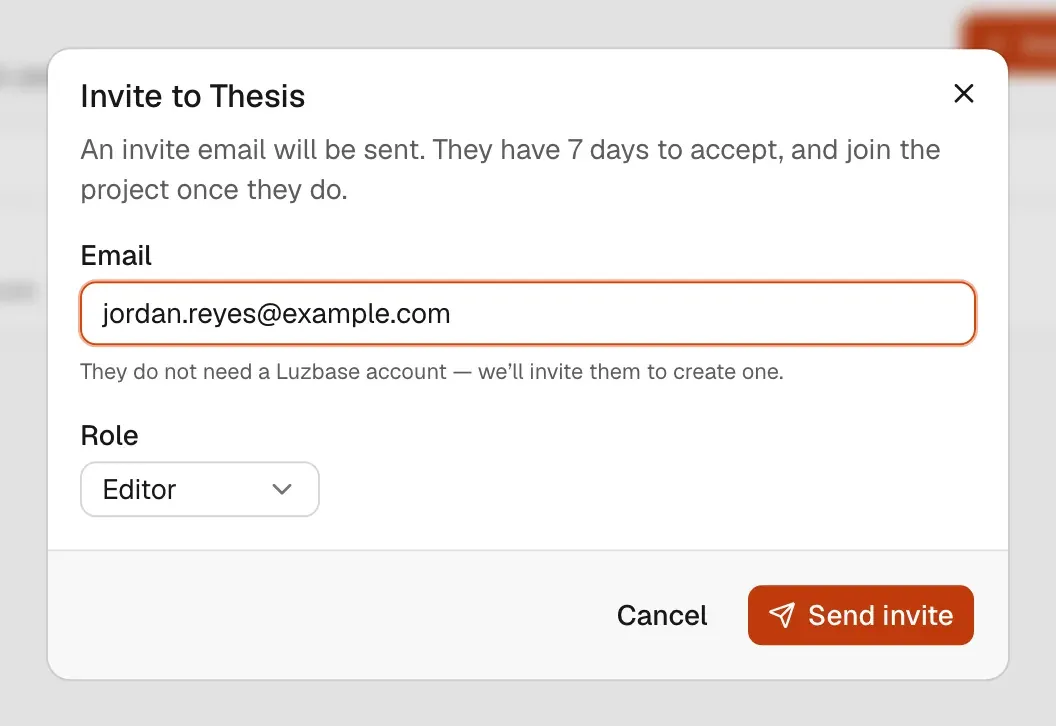
- Click Invite member.
- In Email, type the person’s email address. They do not need a Luzbase account yet; the email invites them to create one.
- Choose a Role: Editor (the default) or Viewer. See Roles and permissions.
- Click Send invite.
Luzbase shows “Invitation sent to {email}.” and emails the invitation. The person has 7 days to accept. They join the project only once they accept; see Accept an invitation.
Collaborator seats
Section titled “Collaborator seats”Each project has a number of collaborator seats, set by the project owner’s plan. Members and pending invitations both use a seat; the owner does not.
- On a limited plan, the Members tab shows how many seats are used, “including pending invitations”.
- If the project is full, the invite dialog tells you how many seats are used out of how many, notes that pending invitations count towards the limit, and offers a button to see the plans.
- A pending invitation keeps its seat until it is accepted, revoked or expires.
The Free plan includes a limited number of collaborators per project. For current numbers, see luzbase.com/pricing and Plans and limits.
Manage pending invitations
Section titled “Manage pending invitations”Pending invitations are listed under Pending invitations on the Members tab, with the date each one expires. Only the owner sees this list.
For each invitation you can:
- Change the role it offers, with the role menu in its row.
- Resend invitation from the row’s menu. A resend sends the same link again and gives the person another 7 days. You can resend once every 2 minutes, up to 5 emails per invitation in total. After that the menu shows “No resends left”; revoke the invitation and invite the person again.
- Revoke invitation from the row’s menu. The link stops working and the seat is freed. You can invite the person again later.
Limits
Section titled “Limits”| Limit | Value |
|---|---|
| Time to accept | 7 days |
| Resends | One every 2 minutes, at most 5 emails per invitation |
| Invitations to the same address | At most 3 new invitations in 24 hours, across all your projects |
| Invitations you can send | 30 per hour |