Common LaTeX errors and how to fix them
Most failed compiles come from a small set of LaTeX mistakes. This page shows how to read an error in Luzbase and links to a fix for each of the most common messages.
How to read an error in Luzbase
Section titled “How to read an error in Luzbase”- Compile your document. If it fails, the Output panel below the editor opens on an error summary.
- Each error appears once, with its file and line (for example
main.tex:7), the source line and, for many errors, a hint on how to fix it. - Click the file and line to jump to the spot in the editor. The line is also marked with a red wavy underline.
- To see everything LaTeX printed, click Show full log.
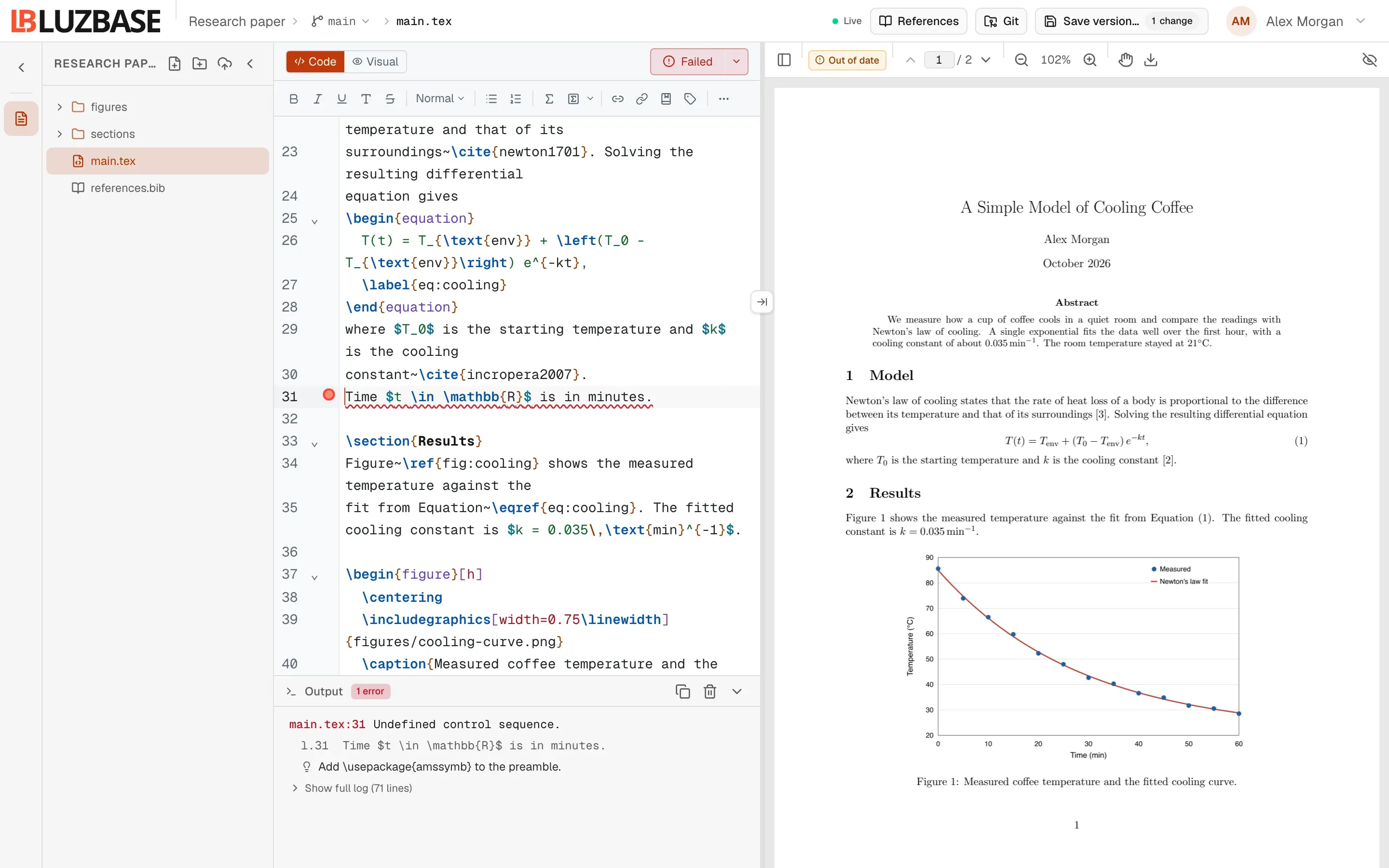
Luzbase stops at the first error, so fix that one and compile again. Later errors are often side effects of the first.
When a compile fails, the preview keeps the last PDF that worked and marks it Out of date. For more on the Output panel, see Compile logs and errors.
Errors that stop the compile
Section titled “Errors that stop the compile”| Message in the log | What it usually means | Fix |
|---|---|---|
Undefined control sequence. |
A misspelled command, or a command whose package is not loaded | Undefined control sequence |
Missing $ inserted. |
A math symbol such as ^, _ or \alpha outside math mode |
Missing $ inserted |
LaTeX Error: File `…' not found. |
A package, class, image or input file that LaTeX cannot find | File not found |
LaTeX Error: Missing \begin{document}. |
Text or a stray character in the preamble | Missing \begin{document} |
Runaway argument? with Paragraph ended before … was complete. or File ended while scanning use of … |
A { that is never closed |
Runaway argument |
Too many }'s. |
A } with no matching { |
Too many }’s |
Warnings that do not stop the compile
Section titled “Warnings that do not stop the compile”Warnings still produce a PDF, but the result may look wrong. They appear in the full log, and Luzbase marks the affected line in the editor with a wavy underline.
| Message in the log | What it usually means | Fix |
|---|---|---|
Citation `…' on page … undefined |
A \cite key that is not in your bibliography |
Citation undefined |
Overfull \hbox / Underfull \hbox |
A line that is too wide, or too loosely spaced | Overfull and underfull boxes |
Other messages you may see
Section titled “Other messages you may see”LaTeX Error: Environment … undefined.An environment such asalignortikzpictureneeds a package. The hint names it, for example “Add \usepackage{amsmath} to the preamble.”LaTeX Error: \begin{itemize} on input line 4 ended by \end{document}.An environment was opened but never closed. Add the missing\end{…}.LaTeX Error: Unicode character ≈ (U+2248) not set up for use with LaTeX.pdfLaTeX cannot print that character. Replace it, or switch to XeLaTeX with% !TEX program = xelatexas the first line of the main file. See Compilers and TeX Live.The document took longer than the 55 s time limit to compile and was stopped.Large TikZ or pgfplots figures are the usual cause. See Compiling.
Not on Luzbase yet? It compiles LaTeX in your browser and links each error to its line, often with the fix. Start writing free.