Import an existing LaTeX project
Already have a LaTeX project on your computer or in another editor? Put its files in a .zip and import it. Luzbase creates a new project with all your files and folders, ready to compile.
What comes across
Section titled “What comes across”| Imported | Not imported |
|---|---|
Your .tex, .bib, .sty, .cls and other source files |
Version history, comments and settings from another tool |
| Images in PNG, JPG, GIF, WebP, PDF or EPS format | Unsupported file types, such as SVG images and font files (see step 3) |
| Your folder structure | Collaborators and sharing |
1. Make a .zip of your project
Section titled “1. Make a .zip of your project”- Files on your computer: compress the project folder. On macOS, right-click the folder and choose Compress. On Windows, right-click it and choose Send to → Compressed (zipped) folder.
- Another online editor: use its option to download the project’s source as a
.zip.
Before you zip, it helps to know two things about your project, because a .zip doesn’t record them: which file is the main document, and which compiler it uses (pdfLaTeX, XeLaTeX or LuaLaTeX). Steps 4 and 5 show how Luzbase handles both.
2. Import the .zip
Section titled “2. Import the .zip”- Go to your projects and click New project.
- Under Start from, choose Import .zip.
- Drop the
.ziponto Upload a .zip, or click it to choose the file. The project name is filled in from the file name; change it if you like. - Click Import project.
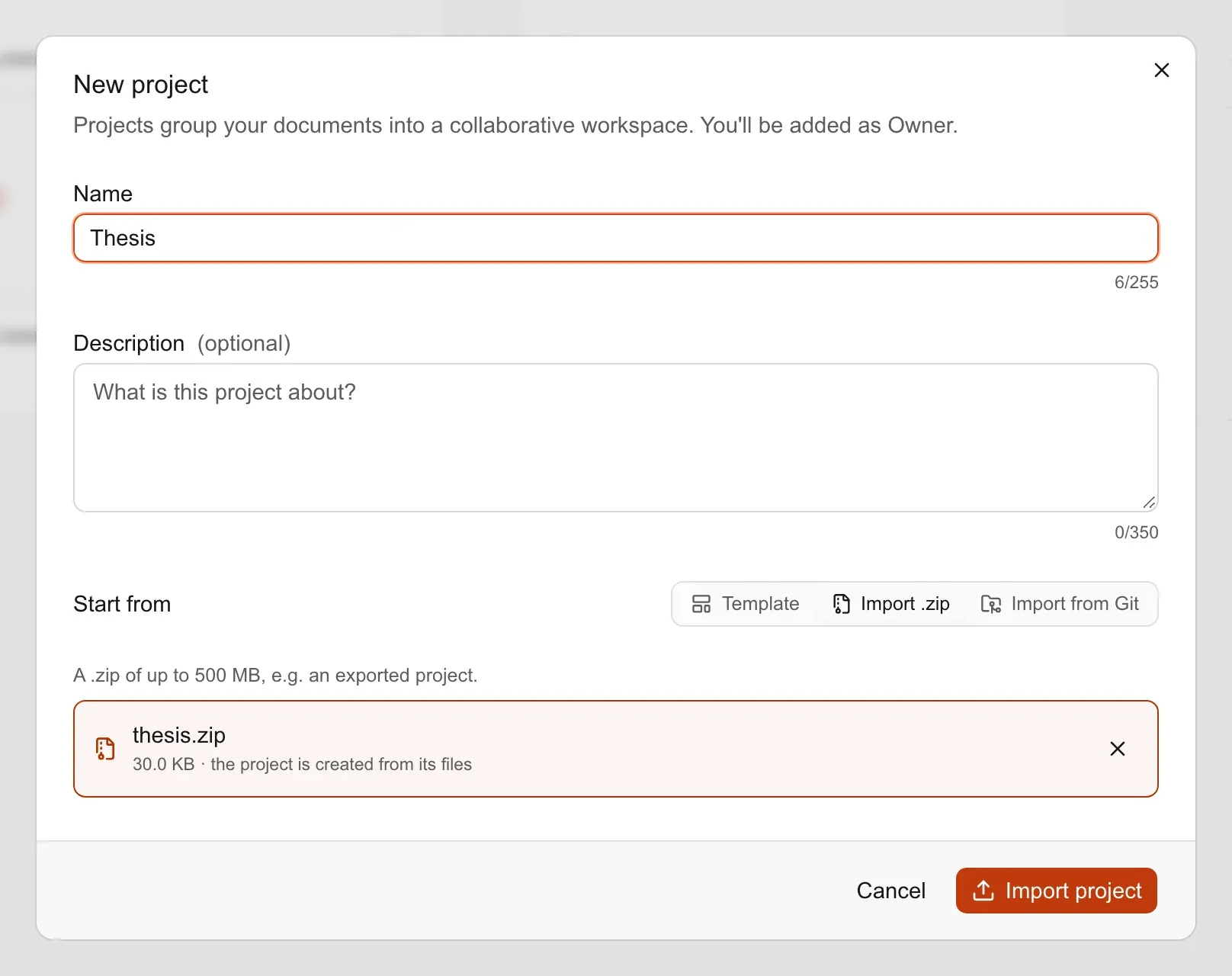
Luzbase uploads the file, checks and extracts it, and opens the new project. Large projects can take a minute. You can close the dialog; the import carries on, and the project appears in your list when it’s ready.
You need a confirmed email address to import a project. A project can hold up to 500 files and 500 MB. For every limit, see Upload and import.
3. Check the import message
Section titled “3. Check the import message”When the import finishes, Luzbase tells you if it skipped anything, for example “Skipped 2 files: …”, with the reason for each. Files are skipped when:
- The file type isn’t supported. SVG images, font files (
.ttf,.otf), Word documents and code files such as.pyor.Rcan’t be stored. Convert SVG images to PDF or PNG and upload them again. - The file is too large. Text files can be up to 1 MB, and images or PDFs up to 10 MB.
- The file is a
latexmkrc. Luzbase never runs project build scripts. - The file is system clutter, such as
__MACOSXor.DS_Store. These are dropped silently.
If some text files use an older encoding, Luzbase converts them to UTF-8 and tells you which ones. Check that their accented letters look right.
4. Check the main file
Section titled “4. Check the main file”Luzbase picks the main file for you when it imports. It looks for, in order:
- A
% !TEX root = …comment at the top of a.texfile, naming the main file. - A file called
main.texat the top level of the project. - The
.texfile that has both\documentclassand\begin{document}.
If your project has several candidate files and Luzbase picks the wrong one, rename your main document to main.tex at the top level and import again. See The main file.
5. Check the compiler
Section titled “5. Check the compiler”Luzbase uses pdfLaTeX unless the main file says otherwise:
- It switches to XeLaTeX automatically when the main file loads
fontspec,unicode-math,polyglossia,xltxtraorxunicode. - For LuaLaTeX, or to be explicit, add a magic comment on its own line near the top of the main file:
% !TEX program = lualatex\documentclass{article}\usepackage{fontspec}\begin{document}Hello from LuaLaTeX.\end{document}The supported values are pdflatex, xelatex and lualatex. See Compilers and TeX Live.
6. Compile
Section titled “6. Compile”Click Compile. Most projects compile unchanged. If yours doesn’t, these are the usual reasons:
| Cause | What to do |
|---|---|
| TeX Live version. Luzbase uses one recent TeX Live distribution for every project. | If your project relied on an older package version, update the code for the current one. |
| A package that isn’t in TeX Live. Compiles have no internet access, so nothing is downloaded. | Upload the package’s .sty or .cls file. Luzbase finds it in any folder of the project. |
Custom latexmkrc rules, such as search paths or extra tools. |
They don’t run. Search paths aren’t needed, because Luzbase searches every folder of the project. |
Shell escape. Packages that run external programs, such as minted, pythontex or svg, need it, and Luzbase doesn’t allow it. |
Use listings instead of minted, and convert SVG images to PDF. |
Custom fonts as .ttf or .otf files. |
Font files can’t be uploaded. Use a font that ships with TeX Live. |
A top-level folder named out. Luzbase reserves it for compile output. |
Rename the folder and update the paths that point to it. |
For a specific error message, see Common LaTeX errors.
7. Invite your co-authors
Section titled “7. Invite your co-authors”Collaborators don’t come with the .zip. Invite them from the project’s Members tab. See Invite collaborators.